 jacin.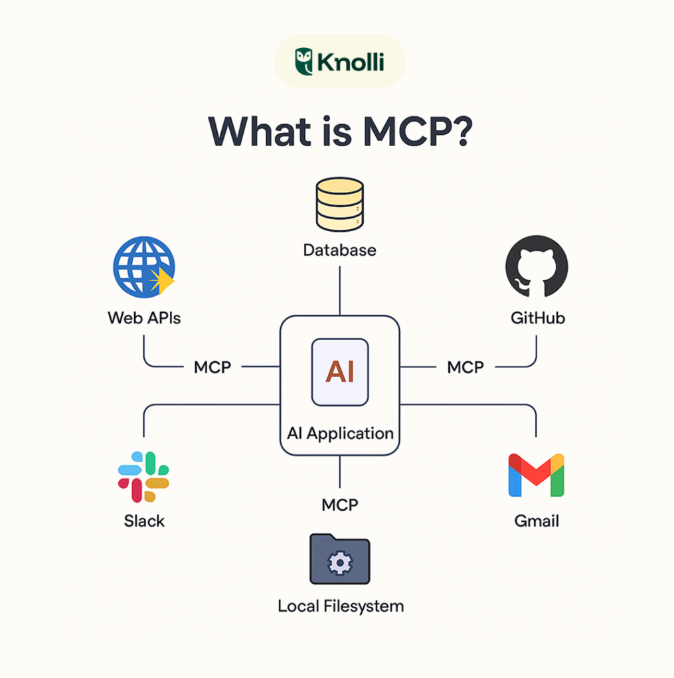
AI 摘要展开 / 收起
这是一篇面向 AI 应用开发者的 MCP 开发入门与实践笔记,围绕 Model Context Protocol 如何把 Claude、IDE、ChatGPT 等 AI 客户端与外部系统标准化连接起来展开。内容先说明 MCP 的分层架构:Host、Client、JSON-RPC 2.0 协议、STDIO 或 HTTP 传输以及 Server 侧能力提供,并将 Tool、Skill、MCP 放在执行方式和适用场景上对比,帮助读者判断何时需要协议化接入而不是单个工具或本地技能。实践部分给出 Python 环境准备、uv 依赖安装、FastMCP 服务器开发示例,包括天气查询、SQLite 数据库查询,以及 STDIO 模式下日志必须写入 stderr、避免破坏 JSON-RPC 消息的注意事项。客户端部分展示了通过 ClientSession、stdio_client 连接服务器、列出工具、结合 Anthropic API 处理 tool_use 循环并回传工具结果的完整流程,同时补充 OpenAI Responses API 中以 mcp 工具类型接入远程服务器、使用 allowed_tools 控制暴露范围的写法。后续章节梳理 Tools、Resources、Prompts 三类核心能力、工具列表变化通知机制,以及开发工具、数据分析、业务自动化和旅行规划等应用场景,适合想从概念、协议结构到最小可运行代码建立 MCP 开发框架的读者。
MCP 开发#
什么是 MCP?#
MCP (Model Context Protocol) 是由 Anthropic 开发的开源标准,用于连接 AI 应用与外部系统。它像 USB-C 端口一样为 AI 应用提供标准化的连接方式。
MCP 的核心价值#
- 标准化接口 - 统一的协议让 AI 应用可以无缝集成各种外部服务
- 模块化设计 - 每个 MCP 服务器独立运行,互不影响
- 安全隔离 - 通过标准化协议实现权限控制和安全隔离
- 生态繁荣 - 支持 Claude Desktop、Claude Code、VS Code、Cursor 等多个客户端
MCP 架构详解#
核心参与者#
┌─────────────────────────────────────────┐
│         MCP Host (AI Application)       │
│  (Claude Desktop / Claude Code / IDE)   │
└────────────────┬────────────────────────┘
                 │
    ┌────────────┼────────────┐
    │            │            │
┌───▼──┐    ┌───▼──┐    ┌───▼──┐
│MCP   │    │MCP   │    │MCP   │
│Client│    │Client│    │Client│
└───┬──┘    └───┬──┘    └───┬──┘
    │           │           │
┌───▼──────┐ ┌─▼────────┐ ┌─▼────────┐
│MCP Server│ │MCP Server│ │MCP Server│
│(Local)   │ │(Local)   │ │(Remote)  │
└──────────┘ └──────────┘ └──────────┘
架构层次#
| 层级 | 说明 |
|---|---|
| 应用层 | Claude、IDE、AI 应用 |
| 客户端层 | MCP Client 维护连接和消息路由 |
| 协议层 | JSON-RPC 2.0 定义消息结构 |
| 传输层 | STDIO、HTTP Streamable 等通信方式 |
| 服务层 | MCP Server 提供工具、资源、提示词 |
MCP 与 Skills、Tools 的关系#
三个核心概念对比#
| 概念 | 定义 | 执行方式 | 适用场景 |
|---|---|---|---|
| Tool | 具体的能力或工具 | 直接调用 | 单一、简单的操作 |
| Skill | 能力的使用手册和执行指南 | 本地 SKILL.md + 脚本 | 复杂的多步骤工作流 |
| MCP | 标准化的能力接入协议 | 远程服务器 + 标准协议 | 大规模、分布式���统 |
MCP 与 OpenAI Responses API 的集成#
在 OpenAI Responses API 中,MCP 作为一种工具类型被集成:
from openai import OpenAI

client = OpenAI()

response = client.responses.create(
    model="gpt-5.4",
    tools=[
        {
            "type": "mcp",
            "server_label": "docs",
            "server_url": "https://developers.openai.com/mcp",
            # 可选:限制只暴露部分工具,避免工具太多
            "allowed_tools": ["search_docs", "read_page"],
            # 可选:有的 MCP server 需要认证
            # "headers": {
            #     "Authorization": "Bearer YOUR_TOKEN"
            # },
        }
    ],
    input="帮我查一下 OpenAI Responses API 里 MCP tool 的使用方式,并给我一个简短总结。",
)

print(response.output_text)
关键参数说明:
type: "mcp"- 声明这是一个 MCP 工具server_label- MCP 服务器的标识符server_url- MCP 服务器的地址allowed_tools- 限制暴露的工具列表(可选但推荐)headers- 认证信息(如需要)
为什么要用 allowed_tools?
- 减少 token 开销
- 帮助模型更快发现正确的工具
- 提高安全性,只暴露必要的工具
MCP 服务器开发#
环境准备#
# 安装 uv(推荐的 Python 包管理工具)
curl -LsSf https://astral.sh/uv/install.sh | sh

# 创建项目
uv init my-mcp-server
cd my-mcp-server
uv venv
source .venv/bin/activate

# 安装依赖
uv add "mcp[cli]" httpx
使用 FastMCP 构建服务器#
FastMCP 是最简洁的 MCP 服务器开发框架,使用 Python 类型提示和文档字符串自动生成工具定义。
基础示例:天气服务#
from typing import Any
import httpx
from mcp.server.fastmcp import FastMCP

# 初始化 FastMCP 服务器
mcp = FastMCP("weather")

@mcp.tool()
async def get_forecast(latitude: float, longitude: float) -> str:
    """
    获取指定位置的天气预报

    Args:
        latitude: 纬度
        longitude: 经度

    Returns:
        天气预报信息
    """
    async with httpx.AsyncClient() as client:
        response = await client.get(
            f"https://api.weather.gov/points/{latitude},{longitude}"
        )
        return response.text

@mcp.tool()
async def get_alerts(state: str) -> str:
    """
    获取指定州的天气警报

    Args:
        state: 州代码(如 'CA'、'NY')

    Returns:
        天气警报信息
    """
    async with httpx.AsyncClient() as client:
        response = await client.get(
            f"https://api.weather.gov/alerts/active?area={state}"
        )
        return response.text

if __name__ == "__main__":
    mcp.run()
高级示例:数据库查询服务#
from mcp.server.fastmcp import FastMCP
import sqlite3
from typing import Any

mcp = FastMCP("database")

@mcp.tool()
def query_database(sql: str, params: dict = None) -> str:
    """
    执行数据库查询

    Args:
        sql: SQL 查询语句
        params: 查询参数(可选)

    Returns:
        查询结果
    """
    try:
        conn = sqlite3.connect("app.db")
        cursor = conn.cursor()

        if params:
            cursor.execute(sql, params)
        else:
            cursor.execute(sql)

        results = cursor.fetchall()
        conn.close()

        return str(results)
    except Exception as e:
        return f"Error: {str(e)}"

@mcp.tool()
def get_schema() -> str:
    """获取数据库架构信息"""
    conn = sqlite3.connect("app.db")
    cursor = conn.cursor()

    cursor.execute(
        "SELECT name FROM sqlite_master WHERE type='table'"
    )
    tables = cursor.fetchall()

    schema_info = []
    for table in tables:
        table_name = table[0]
        cursor.execute(f"PRAGMA table_info({table_name})")
        columns = cursor.fetchall()
        schema_info.append(f"{table_name}: {columns}")

    conn.close()
    return "\n".join(schema_info)

if __name__ == "__main__":
    mcp.run()
重要的日志注意事项#
STDIO 服务器的限制:
- ❌ 不能写入 stdout(会破坏 JSON-RPC 消息)
- ✅ 使用
print(..., file=sys.stderr)输出日志 - ✅ 使用 Python 的
logging库
import sys
import logging

# 配置日志
logging.basicConfig(
    level=logging.DEBUG,
    format='%(asctime)s - %(name)s - %(levelname)s - %(message)s',
    stream=sys.stderr  # 重定向到 stderr
)

logger = logging.getLogger(__name__)

@mcp.tool()
def my_tool():
    """示例工具"""
    logger.debug("这是一条调试信息")
    logger.info("这是一条信息")
    return "success"
MCP 客户端开发#
环境准备#
uv init mcp-client
cd mcp-client
uv venv
source .venv/bin/activate
uv add mcp anthropic python-dotenv
构建完整的 MCP 客户端#
import asyncio
import sys
from contextlib import AsyncExitStack
from mcp import ClientSession, StdioServerParameters
from mcp.client.stdio import stdio_client
from anthropic import Anthropic

class MCPClient:
    def __init__(self):
        self.session = None
        self.exit_stack = AsyncExitStack()
        self.anthropic = Anthropic()
        self.tools = []

    async def connect_to_server(self, server_script_path: str):
        """
        连接到 MCP 服务器

        Args:
            server_script_path: 服务器脚本路径(.py 或 .js)
        """
        is_python = server_script_path.endswith('.py')
        command = "python" if is_python else "node"

        server_params = StdioServerParameters(
            command=command,
            args=[server_script_path],
            env=None
        )

        # 建立 STDIO 连接
        stdio_transport = await self.exit_stack.enter_async_context(
            stdio_client(server_params)
        )
        self.stdio, self.write = stdio_transport

        # 创建客户端会话
        self.session = await self.exit_stack.enter_async_context(
            ClientSession(self.stdio, self.write)
        )

        # 初始化会话
        await self.session.initialize()

        # 获取可用工具
        response = await self.session.list_tools()
        self.tools = response.tools
        print(f"✓ 已连接到服务器,可用工具:{[tool.name for tool in self.tools]}")

    async def process_query(self, query: str) -> str:
        """
        处理用户查询并调用相应工具

        Args:
            query: 用户查询

        Returns:
            处理结果
        """
        messages = [{"role": "user", "content": query}]

        # 构建工具定义
        available_tools = [
            {
                "name": tool.name,
                "description": tool.description,
                "input_schema": tool.inputSchema
            }
            for tool in self.tools
        ]

        # 调用 Claude API
        response = self.anthropic.messages.create(
            model="[REDACTED]",
            max_tokens=1000,
            messages=messages,
            tools=available_tools
        )

        # 处理工具调用
        while response.stop_reason == "tool_use":
            tool_use = next(
                (block for block in response.content if block.type == "tool_use"),
                None
            )

            if not tool_use:
                break

            # 调用 MCP 工具
            tool_result = await self.session.call_tool(
                tool_use.name,
                tool_use.input
            )

            # 继续对话
            messages.append({"role": "assistant", "content": response.content})
            messages.append({
                "role": "user",
                "content": [
                    {
                        "type": "tool_result",
                        "tool_use_id": tool_use.id,
                        "content": tool_result.content[0].text
                    }
                ]
            })

            response = self.anthropic.messages.create(
                model="[REDACTED]",
                max_tokens=1000,
                messages=messages,
                tools=available_tools
            )

        # 提取最终文本响应
        final_response = next(
            (block.text for block in response.content if hasattr(block, "text")),
            "No response"
        )

        return final_response

    async def close(self):
        """关闭连接"""
        await self.exit_stack.aclose()

async def main():
    client = MCPClient()
    try:
        # 连接到服务器
        await client.connect_to_server("weather_server.py")

        # 处理查询
        result = await client.process_query("获取纽约的天气预报")
        print(f"\n结果:{result}")
    finally:
        await client.close()

if __name__ == "__main__":
    asyncio.run(main())
MCP 的三大核心功能#
1. Tools(工具)#
工具是 MCP 服务器暴露的可执行函数。
@mcp.tool()
def calculate(operation: str, a: float, b: float) -> float:
    """
    执行数学运算

    Args:
        operation: 运算类型 (add, subtract, multiply, divide)
        a: 第一个数字
        b: 第二个数字

    Returns:
        运算结果
    """
    if operation == "add":
        return a + b
    elif operation == "subtract":
        return a - b
    elif operation == "multiply":
        return a * b
    elif operation == "divide":
        return a / b if b != 0 else None
2. Resources(资源)#
资源是 MCP 服务器提供的可读取的数据或文件。
@mcp.resource("file://documents/{filename}")
def read_document(filename: str) -> str:
    """读取文档文件"""
    with open(f"documents/{filename}", "r") as f:
        return f.read()

@mcp.resource("database://users/{user_id}")
def get_user_info(user_id: str) -> str:
    """获取用户信息"""
    # 从数据库查询用户信息
    return f"User {user_id} info"
3. Prompts(提示词)#
提示词是预定义的 AI 提示词模���,可以被客户端调用。
@mcp.prompt()
def code_review_prompt(language: str, code: str) -> str:
    """
    代码审查提示词

    Args:
        language: 编程语言
        code: 代码内容

    Returns:
        格式化的提示词
    """
    return f"""
请审查以下 {language} 代码:

```{language}
{code}
请检查:
- 代码风格和可读性
- 潜在的性能问题
- 安全漏洞
- 最佳实践 """
---

## MCP 的通知系统

MCP 支持实时通知机制,让客户端能够动态感知服务器状态变化。

### 工具列表变化通知

```json
{
  "jsonrpc": "2.0",
  "method": "notifications/tools/list_changed",
  "params": {}
}
客户端收到通知后会请求更新的工具列表:
{
  "jsonrpc": "2.0",
  "id": 4,
  "method": "tools/list"
}
为什么通知很重要?#
- 动态环境 - 工具可能基于服务器状态、外部依赖或用户权限而变化
- 效率 - 客户端不需要轮询;当更新发生时会被通知
- 一致性 - 确保客户端始终拥有关于可用服务器功能的准确信息
- 实时协作 - 使 AI 应用能够适应不断变化的上下文
MCP 的实际应用案例#
1. 开发工具集成#
IDE (VS Code / Cursor)
    ↓
MCP Client
    ↓
MCP Server (Git + Code Analysis)
    ├── git_commit_tool
    ├── code_review_tool
    ├── test_runner_tool
    └── documentation_generator_tool
应用场景:
- AI 辅助编码
- 自动代码审查
- 测试生成和执行
- 文档自动生成
2. 数据和分析#
Analytics Dashboard
    ↓
MCP Client
    ↓
MCP Server (Data Pipeline)
    ├── query_database_tool
    ├── data_transformation_tool
    ├── visualization_tool
    └── alert_tool
应用场景:
- 数据库查询优化
- 数据管道监控
- 分析仪表板集成
- 日志分析和故障排除
3. 业务运营自动化#
CRM System
    ↓
MCP Client
    ↓
MCP Server (Business Tools)
    ├── customer_lookup_tool
    ├── ticket_creation_tool
    ├── email_tool
    └── report_generation_tool
应用场景:
- 客户支持自动化
- 文档处理和知识库集成
- 电子邮件和通信管理
- 项目管理和任务自动化
4. 旅行规划完整示例#
用户请求:"帮我规划一个欧洲之旅"
    ↓
AI 读取资源:
  - calendar://my-calendar/June-2024
  - travel://preferences/europe
  - travel://past-trips/Spain-2023
    ↓
AI 执行工具:
  - searchFlights() → 查询航班
  - checkWeather() → 获取天气
  - bookHotel() → 预订酒店
  - createCalendarEvent() → 添加日历
  - sendEmail() → 发送确认
    ↓
结果:完整的旅行计划
MCP 支持的客户端#
| 客户端 | 支持情况 | 用途 |
|---|---|---|
| Claude Desktop | ✅ 完全支持 | 桌面应用 |
| Claude Code | ✅ 完全支持 | CLI 工具 |
| VS Code + Copilot | ✅ 完全支持 | 代码编辑 |
| Cursor | ✅ 完全支持 | AI IDE |
| JetBrains IDEs | ✅ 完全支持 | 开发工具 |
| Zed Editor | ✅ 完全支持 | 代码编辑 |
| ChatGPT | ✅ 完全支持 | Web 应用 |
关键资源#
- MCP 官方文档
- MCP 规范
- GitHub 组织
- MCP 服务器仓库
- MCP Inspector - 可视化测试工具
总结#
MCP 是现代 AI 应用的基础设施,通过标准化协议实现了 AI 与外部系统的无缝集成。
关键要点:
- MCP 是标准化的能力接入协议
- 支持 Tools、Resources、Prompts 三大功能
- 提供完整的安全隔离和权限控制机制
- 拥有广泛的生态系统支持
- 适合大规模、分布式的 AI 应用架构
评论
还没有评论,来发第一个吧